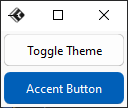
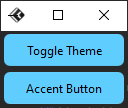
修改主题模式(深浅模式)
深入理解主题模式设计
在现代应用程序开发中,支持深浅双主题模式已成为用户体验的基本要求。TkFluent通过FluThemeManager提供了灵活的主题管理能力,让开发者能够轻松实现这一功能。
主题模式的核心概念
- 视觉一致性:确保应用在两种模式下都保持专业外观
- 色彩对比度:浅色模式需要足够的对比度,深色模式需要减少眩光
- 自适应组件:所有UI元素应能自动适应主题变化
主题模式
共有两个模式,一个Light,一个Dark
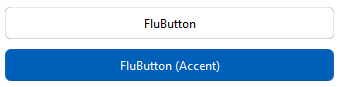 Light
Light
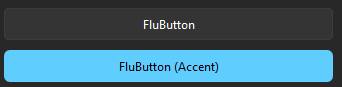 Dark
Dark
修改主题模式
修改主题模式可以使用以下方法
导入方法并实例一个主题管理器(需要在创建主窗口之后实例)
from tkflu.thememanager import FluThemeManager
thememanager = FluThemeManager()
thememanager.mode("light")  # 浅色模式
thememanager.mode("Light")  # 浅色模式,这样输入也行
thememanager.mode("dark")  # 深色模式
thememanager.mode("Dark")  # 深色模式,这样输入也行
color1为浅色主题时的主题色,color2为深色主题时的主题色
扩展(切换主题的按钮)
导入组件、方法
from tkflu import FluToggleButton, toggle_theme
tbtn = FluToggleButton(
    text="Toggle Theme", command=lambda: toggle_theme(tbtn, thememanager)
)
完整升级版实例
from tkflu import FluWindow, FluButton, FluToggleButton, FluThemeManager, toggle_theme, ACCENT

root = FluWindow()

theme_manager = FluThemeManager(root)
toggle_button = FluToggleButton(
    text="Toggle Theme", command=lambda: toggle_theme(toggle_button, theme_manager)
)
toggle_button.pack(padx=3, pady=3, )

button = FluButton(root, text="Accent Button", style=ACCENT)
button.pack(padx=3, pady=3, )

root.mainloop()