版本0.1.1更新!
新增
部分组件实现切换主题时渐变
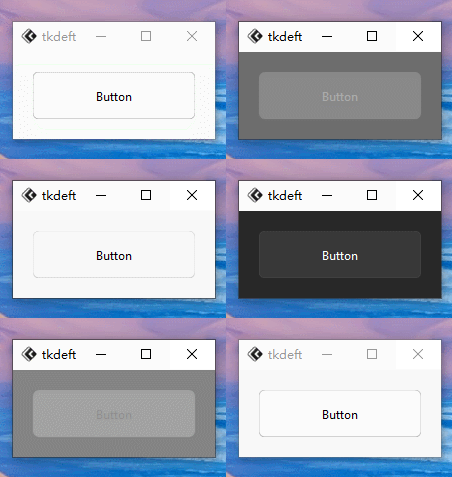
示例1.py
from tkflu import *

root = FluWindow()

theme_manager = FluThemeManager(root)

btn = FluButton(root, text="Button", mode="light", style="standard", command=lambda: theme_manager.toggle())
btn.pack(padx=20, pady=20, fill="both", expand="yes")

root.mainloop()
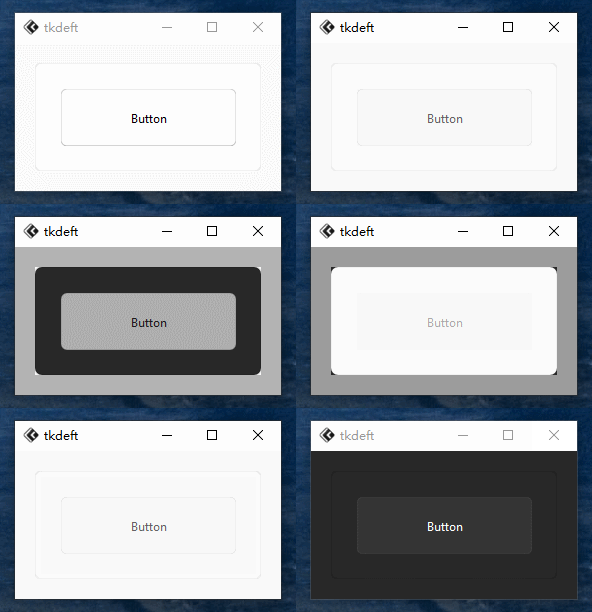
示例2.py
from tkflu import *

root = FluWindow()

theme_manager = FluThemeManager(root)

frame = FluFrame(root, mode="light", style="standard")

btn = FluButton(frame, text="Button", mode="light", style="standard", command=lambda: theme_manager.toggle())
btn.pack(padx=20, pady=20, fill="both", expand="yes")

frame.pack(padx=20, pady=20, fill="both", expand="yes")

root.mainloop()
增进多实现了FluButton、FluFrame(不太完善)的渐变效果
不久将会实现
FluFrame边框渐变,现在只是实现了容器组件的渐变效果,而边框还未制作,导致看的不是太流畅
优化
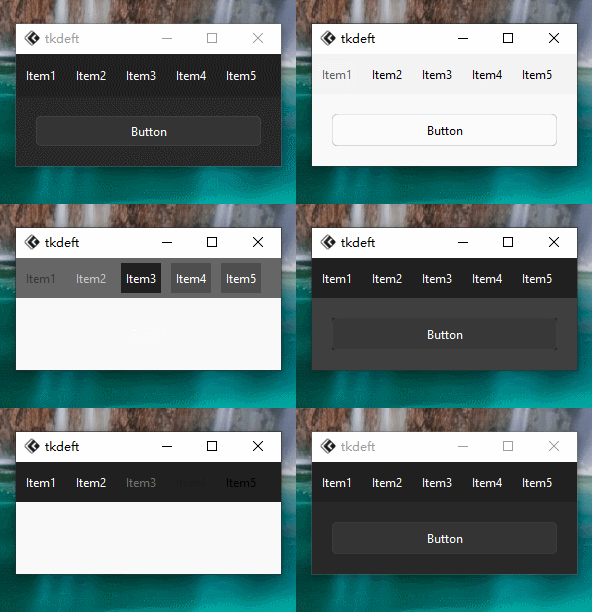
示例3.py
from tkflu import *

set_animation_steps(20)
set_animation_step_time(10)

root = FluWindow()

theme_manager = FluThemeManager(root)

menubar = FluMenuBar(root)
for i in range(5):
    menubar.add_command(label=f"Item{i+1}")
menubar.show()

btn = FluButton(root, text="Button", mode="light", style="standard", command=lambda: theme_manager.toggle())
btn.pack(padx=20, pady=20, fill="both", expand="yes")

root.mainloop()
优化了下部分组件如FluMenu的切换主题时的刷新重绘问题,不会在重绘后出现一些奇怪的问题
FluMenuBar通过add_command创建的项实际上是FluButton,因此未列入增添渐变列表不过从实际上看,高速切换主题也会导致部分组件未渲染